Overview
Look up any film in one right click.
Problem
Saving a film you spot online means copying, switching tabs, pasting and searching.
What I did
I put the search in the right-click menu.
My decisions
I decided what it does and where it sits: in the menu people already use, with the choice of film left to them. Claude Code wrote the code under my direction.
Result
Five steps down to three. Live on Firefox Add-ons.
Get the extension (opens in a new tab)- Category
- Firefox Extension Search Tool
- Project
- Right-Click Film Search
- My role
- (Solo) Research, design and build
- When
- 2026
- Platform
- Firefox
- Built with
- Claude Code
I kept losing films I found on Instagram.
Getting each one into Letterboxd took too long. Browsers already search from the right-click menu, so I put film sites there too.
How might we cut the steps between finding a film online and looking it up on Letterboxd or IMDb?
Five steps down to three.
Before
- Highlight the title
- Copy it
- Open a new tab
- Go to Letterboxd or IMDb
- Paste it and search
With the extension
- Highlight the title
- Right click
- Pick Letterboxd or IMDb
Highlight, right click, pick.
It all happens in a menu people already know.
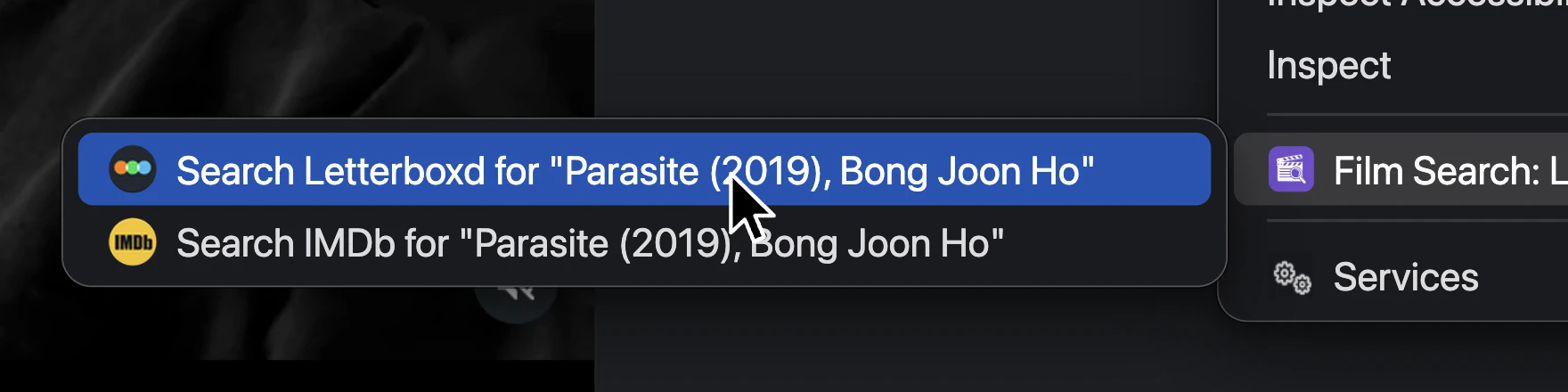
- Parent menu item. One line, both sites inside.
- Leading icons. Recognisable at a glance.
- Dynamic label. Repeats your text to check.
- Submenu items. Two actions, same wording.
It keeps the year and drops the director.
| You highlight | It searches |
|---|---|
| Crash (2004) | Crash 2004 |
| Yi Yi (2000), Edward Yang | Yi Yi 2000 |
| Parasite (2019), Bong Joon Ho | Parasite 2019 |
It collects nothing and doesn’t read the page.
Its only permission is the right-click menu. What you highlight goes only to the site you pick.
What I learned and what’s next
A computer science artist I met at Peckham Digital challenged the premise: copying and pasting isn’t laborious or time-consuming, so the extension overcomplicates a simple task. I disagreed.
One search is quick, but the friction is enough for some people, myself included, to abandon the task and forget the film. Cutting five steps to three, in a menu people already use, means it’s more likely to be saved while they still have it in front of them.
It helps most with films that aren’t in English, because you often can’t type the title on an English keyboard.
Next, I’d time regular Letterboxd users saving five films each way, to test whether fewer steps means more films saved. Then I’d bring it to Chrome.